Trusted by 100+ UK nurses — 50+ NMC-compliant reflections already generated.
NMC Revalidation — sorted, before the panic sets in

Stop dreading your revalidation. Your next reflective account takes 10 minutes, not an afternoon.

Revalidation Copilot turns a voice note into a compliant NMC reflective account. Track your CPD hours, practice hours, and feedback in one place — and go into your revalidation knowing everything is in order.

NMC-compliant reflective accounts Voice-to-draft in seconds Used by 100+ UK nurses
?

"Am I writing this correctly?"

Every reflection is structured to NMC standards — the same requirements your reviewer will check against.

>>

Reflections in minutes, not hours

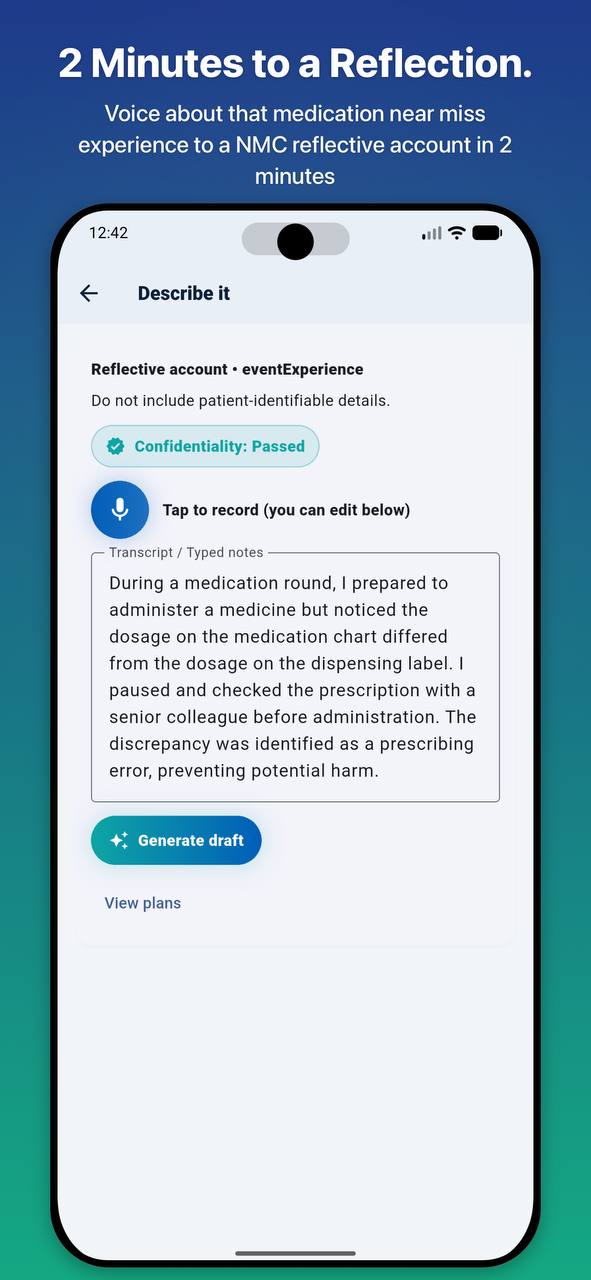
Speak your thoughts out loud. The AI drafts a structured, compliant account. You review and approve. That is it.

#

Everything the NMC needs

CPD hours, practice hours, written reflections, feedback records, supporting certificates. Ready to export.

@

Built around your shifts

Log CPD on your phone between patients. Record a reflection in the car park after a difficult shift. Your records wait where you left them.

The real challenge

Most nurses leave revalidation until it becomes a crisis. That is not a character flaw — it is what happens when the process is this confusing.

You know revalidation is coming. You have known for two years. But every time you open the NMC website, the forms feel unclear, the requirements blur together, and it goes back on the list.

Then three months out, it becomes urgent
You are pulling together CPD records from notebooks, half a folder of emails, and certificates scattered everywhere.
Reflective accounts in one long weekend you resent
Writing five reflections from scratch takes hours — and you are never sure they are structured right.
The quiet worry that you are doing it wrong
That something will not be accepted. That you will have to do it again.
One organised workflow

Revalidation Copilot was built to close all of that down

It keeps your records as you go. It turns a two-minute voice note into a compliant reflective account. When your revalidation window opens, you are not starting from scratch — you are reviewing what is already done.

  • Log CPD and practice-related learning
  • Save and organise feedback
  • Draft reflective accounts from a voice note
  • Track progress toward renewal
  • Prepare records for review and export
How it works

Three parts to revalidation. One place to complete them all.

Heres exactly what happens when you use Revalidation Copilot — from first open to ready-to-submit.

1

Set your date

Start with your revalidation deadline so your progress stays visible.

2

Log CPD

Keep learning activities and practice-related development together.

3

Capture feedback

Save meaningful feedback as you receive it instead of searching later.

4

Draft reflections

Turn notes into a stronger starting point for reflective writing.

5

Organise evidence

Keep supporting files and records accessible when you need them.

6

Track progress

See what you have completed and where more work is needed.

7

Export records

Prepare your information in a clearer format for review.

See it in action

Complete your revalidation in 30 minutes

Watch a full walkthrough — from opening the app to having your records ready for submission.

Feature highlights

Here is exactly what it does

Each feature is focused on one thing: making revalidation less lonely, less confusing, and less last-minute.

CP

CPD Tracker

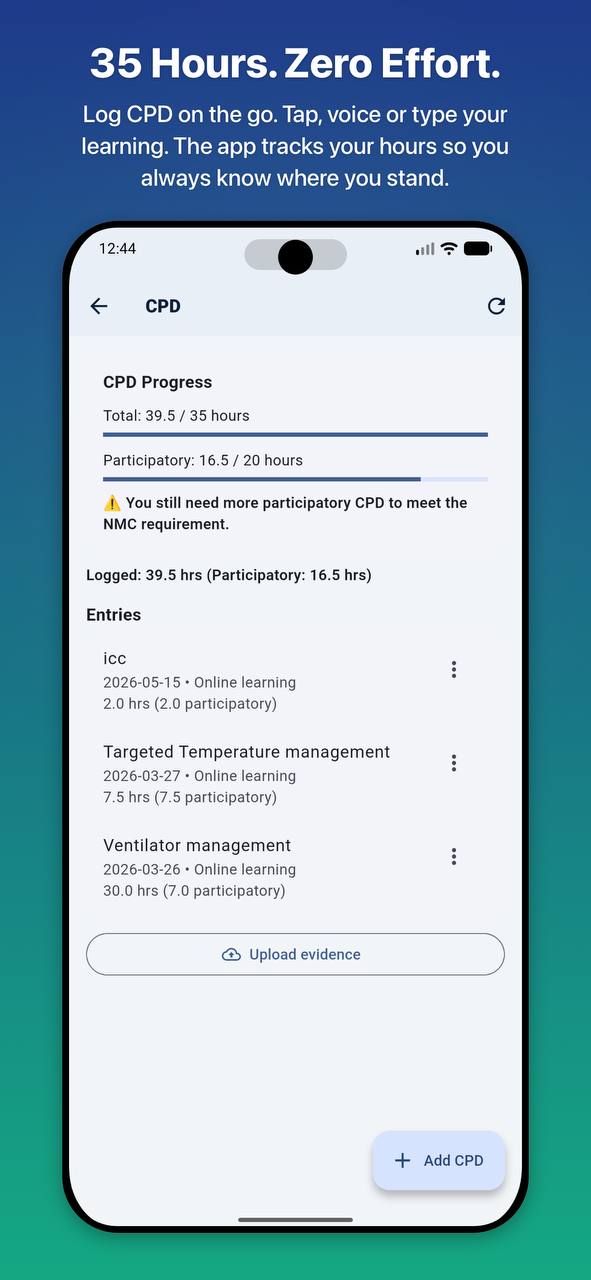
Record learning activity and keep your development history in one place.

FB

Feedback Log

Store valuable feedback so it is easier to revisit when reflecting on practice.

AI

AI Reflective Drafting

Speak your thoughts. The AI drafts a compliant reflective account. You review, edit, and own it.

EV

Evidence Storage

Keep files and supporting material more accessible throughout the cycle.

RM

Reminders

Stay aware of your timeline and avoid leaving key records until the end.

EX

Export Pack

Bring your entries together in a cleaner format that is ready to review before submission.

Product preview

See it in action

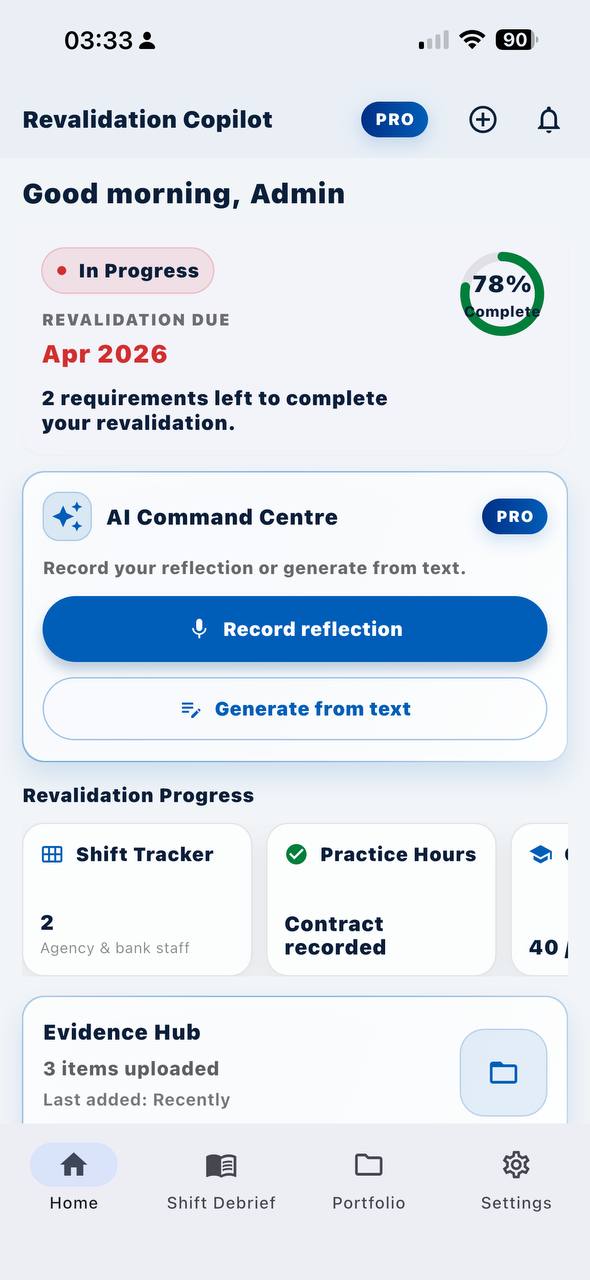
Your CPD log, reflection drafts, and progress dashboard — all in one app designed for shift workers.

Revalidation Copilot dashboard
CPD log screen
Add CPD entry screen
What nurses say

"I do not have to think too much when using it."

Built by a team that includes nurses, for nurses. The goal is not to replace your judgement — it is to make revalidation easier from start to finish.

01

"Absolutely superb for reflections"

"Also makes storing my CPD certificates easier and well organised." — Verified Google Play review

02

"Very nice app for revalidation"

— App Store review, 5 stars

03

"Good app for nurses"

"I do not have to think too much when using it." — Verified Play Store review

Privacy and responsibility

Supportive AI, with you still in control

The app is designed to support organisation and drafting, while keeping professional review and responsibility with the user.

  • Avoid entering patient-identifiable information into records and drafts.
  • Review, edit, and finalise any AI-assisted content before using it.
  • Use the app as a support tool for record-keeping, not as a replacement for professional judgement.
Need support?

We are here to help

Have a question about revalidation, the app, or your account? Visit our support page or read the privacy and terms to understand how your data is handled.

Invite a colleague

Help another nurse stay organised

Know a colleague working through revalidation too? Share your invite link and earn rewards when they join.

  • 1Share your invite link with a colleague.
  • 2They sign up through a dedicated invite page.
  • 3You earn rewards for every successful referral.
Referral programme

Refer a colleague, earn rewards

Share the app with another nurse. When they sign up, you both get something extra. Head to the invite page to get your link.

Get started

Make revalidation less stressful

Keep your CPD, feedback, reflections, and supporting evidence together in one place with Revalidation Copilot.